
Chimpipi LLC · Software for California schools
A parent types an address and sees their school. That is the whole product.
Chimpipi builds the Find My School page for your district. A family enters a home address on their phone and sees the schools their kids are assigned to, on a map, in about ten seconds. We design it, build it, host it, and look after it every year.
We are not trying to out consult the big firms. We are one small California company that does this one thing well, answers the phone, and keeps the price honest.
- Live demo
- Hueneme ESD
- What it does
- Address to school
- Who it is for
- CA districts
- How it is priced
- $500 flat
See it working
Hueneme Elementary School District
We built a working sample for a district right down the road from us. Nine neighborhood elementary schools, two junior highs, the district outline from the state, and a map that feels like it was made this decade. It runs on the same setup your district would get.
The zones in the demo are our best guess until a district hands us its official ones. Nothing goes live until the district signs off on its own boundary data, and the district office always has the final word on enrollment.
- 11 campuses on the map, TK through eighth grade
- Live at hesd-find-my-school.vercel.app
- Built and hosted by Chimpipi LLC
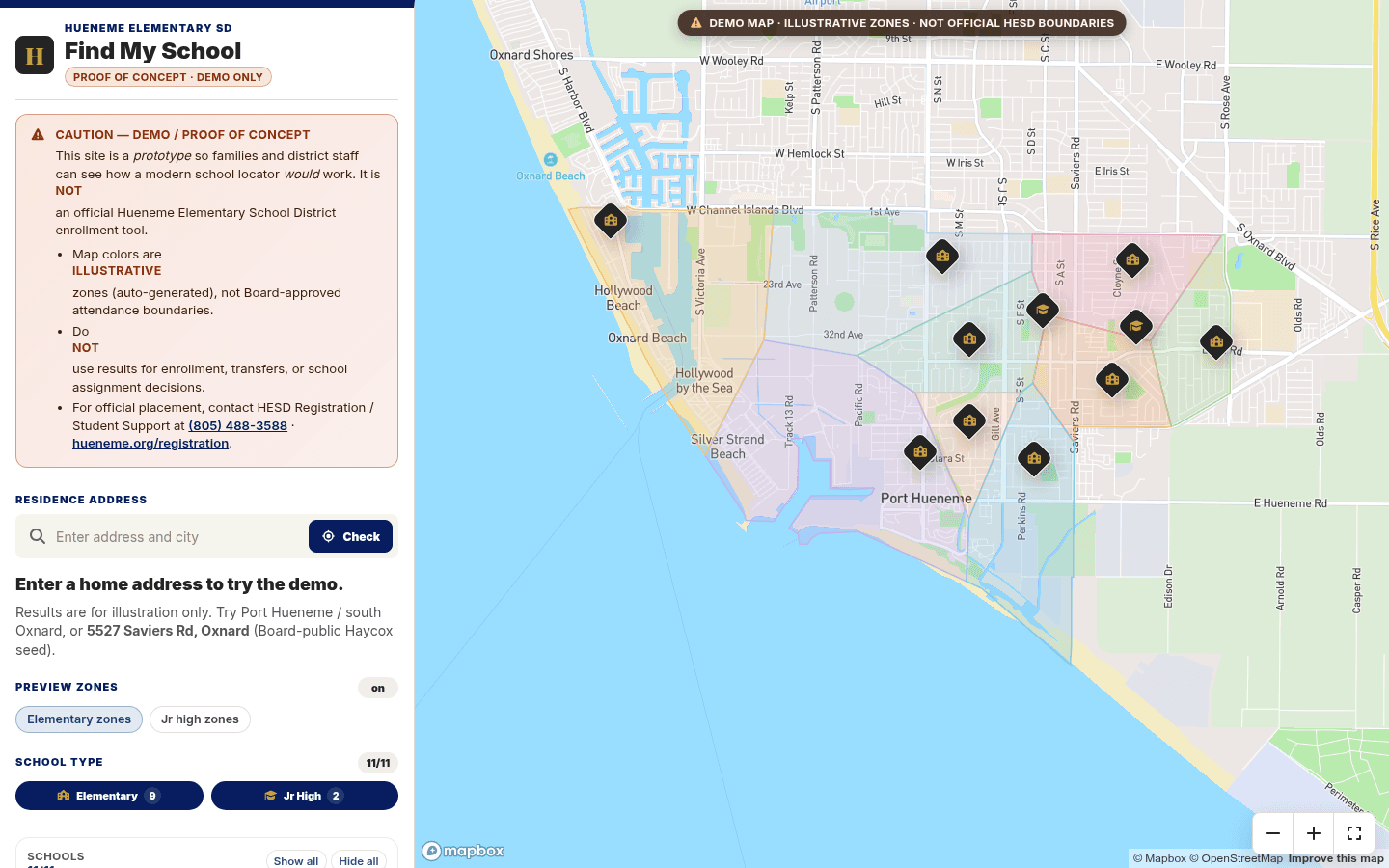
A working sample, not official enrollment
Why us
Made for parents. Answered by a person.
The person using this is usually a mom or dad standing in a kitchen with a phone in one hand, trying to get a kid registered before the window closes. It has to load fast, read clearly, and give a real answer without a phone call. And when your office needs something changed, you talk to the person who built it.
How it feels
Clean, quick, and easy to read on a phone. It looks like a page from your own website, not a mapping tool from 2009.
Made yours
Your colors, your words for things, your school details, trustee areas, a school year picker, and links straight to registration.
How fast
Decisions happen in one conversation instead of getting passed between a sales rep, a project manager, a GIS team, and a support queue.
Who you talk to
You email the person who wrote the code and knows your data. Usually you hear back the same day.
What it costs
One flat number for setup and the year. Nothing buried in an appendix.
What we do
This is the whole product, not a line item tucked inside a facilities consulting package.
A better experience for families, the pieces your district actually needs, a faster start, a real person on the other end, and a careful approval process before anything goes live. Not just a cheaper map.
How it goes
From your data to a page families trust
Drawing a shape on a map is the easy part. The real work is tracking down boundaries that are actually authoritative, converting whatever format they arrive in, testing the addresses that break things, getting your written approval, and keeping it all correct when the lines move. Your district office always has the final say on enrollment.
- 01
Getting to know your district
We walk through your schools, grade levels, how students get assigned, where your boundary files live, the exceptions everyone in the office already knows about, and what changes each school year.
- 02
Getting the data ready
We bring in the GIS files you have approved, or turn the maps and PDFs you do have into something a computer can read correctly.
- 03
Checking the hard cases
We test real addresses, apartment buildings, homes sitting right on a boundary line, new construction, and what a family sees when an address turns up nothing.
- 04
Your approval
You get a private link to review everything. Nothing goes public until someone at the district approves the data in writing.
- 05
Launch and looking after it
We publish the page in your colors, keep an eye on it, roll it over each school year, and make the updates you approve.
What you get
Chimpipi Find My School
Every district gets
- A page in your district colors that works on any phone
- Address search with suggestions as you type
- Your approved attendance boundaries
- Assigned schools by grade level or school type
- A map with school pins and details for each campus
- Registration links and district notices
- Built to WCAG 2.1 AA, keyboard and screen reader tested
- A review window before launch so your team can test it
- Hosting, monitoring, security, and support
- One school year rollover or boundary update every year
Add these if you want them
- Spanish and other languages
- This year and next year boundaries, side by side
- Trustee area lookup
- A printable version of the results
- Address exports ready for Aeries or your SIS
- Cleanup of messy address data
- A full redistricting rollout
- Reports on the searches that came up empty
Accessibility
Your boundary map is a scanned PDF. That is now a legal question.
The federal rule for public agencies sets WCAG 2.1 AA as the standard, and it covers everyday documents — PDFs included. It applies to what is on your website even when an outside company built and hosts it. For most districts the boundary map is one of the most-requested things a parent opens all year, and it is a scan: no text, no headings, nothing a screen reader can read.
April 26, 2027
Districts serving a population of 50,000 or more
April 26, 2028
Districts under 50,000, and special district governments
Those dates moved back a year in April 2026, that change is being challenged in court, and the department has said it may look at the rules again. We do not sell against a countdown, because the countdown keeps moving. The duty not to shut people out is already here, and that is the honest reason to start.
What we build in
- Full keyboard use, a focus outline you can actually see, and labels on every control
- The answer comes back as words, not only a pin on a map, so a screen reader reads it out
- Contrast, zoom, and reflow checked at the sizes people really use
- Address suggestions that work without a mouse
- Tested by software and by hand, and we tell you which found what
- An accessibility statement and a named person to email when something is wrong
- Anything we shipped that turns out to be a barrier, we fix — no charge, for the life of the agreement
What we will never tell you
- That any tool makes your website compliant, or keeps it that way. Nobody can promise that honestly, and the FTC has gone after a vendor who did.
- That an accessibility widget or overlay fixes anything. We do not sell them and we would tell you not to buy one.
- That software finishes this work. It gets the first pass; a person checks it.
- That replacing one PDF clears the whole obligation. It does not — it clears one document, and it is usually your busiest one.
Once we host your locator we can take on the rest of the parent documents too — handbooks, calendars, forms. Software does the first pass, a person reviews every page, and we quote it separately so you can see what you are paying for.
Chimpipi builds websites. We are not lawyers and none of this is legal advice — your district should form its own view with its own counsel.
Pricing
One number. That is the plan.
One Find My School page for your district. We build it, host it, and look after it. Small and midsize California districts, about five to twenty schools.
Setup and the year
$500
We load your approved boundaries, brand the page, and launch after you sign off. Hosting, monitoring, support, and one school-year update. Someone answers when it breaks.
We put a fixed number in writing before we start.
Ask for a written quoteCompared with other tools
Chimpipi
$500
When your boundary files are ready — $500 flat, setup and the year.
Typical locator
$5.5k–$12k
Year one once their setup fee and license (and optional address file) stack up.
Enterprise platforms
Much more
PEA, GuideK12, and full GIS suites sold as analytics projects, not a parent page.
Other-tool figures come from a 2026 California district proposal and public procurement listings. Quotes vary. We send a fixed number for your district.
Live concepts · 20 samples
District samples with school boundary previews
Working Find My School concepts for real California districts — Hueneme first, then the top outreach prospects across Southern California and the Central Valley, from Santa Barbara and Los Angeles to Orange, Fresno, Kings, and San Bernardino counties. Each map loads school pins, the state district outline, and sample elementary boundary fills so you can see the product before certified zones are loaded. Illustrative only — never for enrollment decisions.
- Primary
Hueneme Elementary
Port Hueneme · founding sample · sample boundaries on
9 ES sample zones
Open demo · sample boundaries
- New
Capistrano Unified
Orange · pure gap · 36 elementary samples
36 ES sample zones
Open demo · sample boundaries
- New
Hacienda la Puente Unified
Los Angeles · pure gap
18 ES sample zones
Open demo · sample boundaries
- New
Selma Unified
Fresno · pure gap · hand-verified
7 ES sample zones
Open demo · sample boundaries
- New
Lawndale Elementary
Los Angeles · South Bay
6 ES sample zones
Open demo · sample boundaries
- New
Garvey Elementary
Los Angeles · PDF-only today
9 ES sample zones
Open demo · sample boundaries
- New
Santa Maria-Bonita
Santa Barbara · map only today
17 ES sample zones
Open demo · sample boundaries
- New
Westside Union Elementary
Los Angeles · Antelope Valley
10 ES sample zones
Open demo · sample boundaries
- New
Central Union Elementary
Kings · pure gap
4 ES sample zones
Open demo · sample boundaries
- New
West Covina Unified
Los Angeles · PDF-only today
8 ES sample zones
Open demo · sample boundaries
- New
Silver Valley Unified
San Bernardino · pure gap
5 ES sample zones
Open demo · sample boundaries
- Concept
Hope Elementary
Santa Barbara
Sample zones
Open demo · sample boundaries
- Concept
Carpinteria Unified
Santa Barbara
Sample zones
Open demo · sample boundaries
- Concept
Oak Park Unified
Conejo Valley · map only today
Sample zones
Open demo · sample boundaries
- Concept
Goleta Union Elementary
Santa Barbara · street list today
Sample zones
Open demo · sample boundaries
- Concept
Norris Elementary
Kern · PDF boundaries today
Sample zones
Open demo · sample boundaries
- Concept
Lakeside Union (Kern)
Kern · pure gap
Sample zones
Open demo · sample boundaries
- Concept
Arvin Union
Kern · map only today
Sample zones
Open demo · sample boundaries
- Concept
Beardsley Elementary
Kern
Sample zones
Open demo · sample boundaries
- Concept
Southern Kern Unified
Kern · Rosamond
Sample zones
Open demo · sample boundaries
Concept demos are branded samples for evaluation. Sample boundaries are nearest-campus Voronoi previews clipped to the CDE district polygon — not board-certified attendance areas. They are not affiliated as official district enrollment systems unless a district has contracted, supplied data, and approved launch in writing.
Documents
What to send your business office
Company profile, sample quote, and product brochure — ready to print or forward.
- 01 · Who we are
Company Profile
Who Chimpipi LLC is, what your purchasing office needs on file, and proof we have shipped this before. W-9 whenever you ask.
PDF · 2 pages · Download
- 02 · What it costs
Sample Quote
One flat price for setup and the year, a checklist of options, and a signature line. Laid out like the quotes your board already reads.
PDF · 4 pages · Download
- 03 · Something to leave behind
Product Brochure
What Find My School is, who it helps, and why a small shop can do this better than a big one.
PDF · 4 pages · Download
Chimpipi LLC
A real California company with one product line for schools.
We build websites for local businesses and focused software for school districts. Find My School is a product, not a custom project. One codebase, your district name and colors on top, looked after every year. W-9, statement of work, and insurance whenever your purchasing office needs them.
- Legal name
Chimpipi LLC - Studio
chimpipi.com - Demo
Hueneme ESD Find My School - Email
hello@chimpipi.com
Want to see it with your district on it?
Send us your district name and whether you already have boundary files. We will walk you through the Hueneme demo and put a fixed price in writing.